
Workspaces: a new tab dashboard for every part of the day
One new tab dashboard can’t serve work, study and home at once, so it fills up with widgets that matter a third of the time. Workspaces split it into separate pages, each with its own widgets, and a small switcher flips between them. The free plan comes with three.
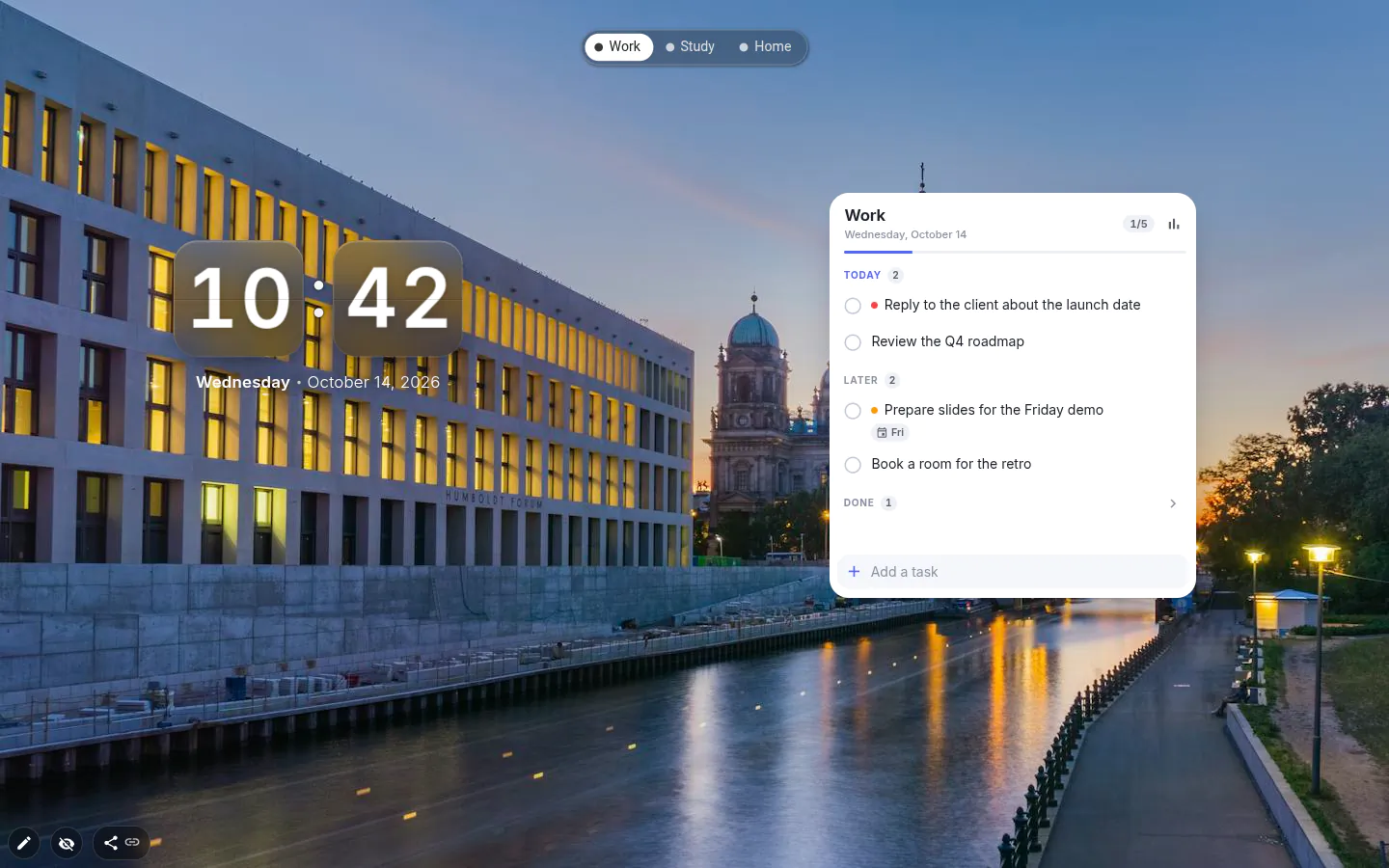
What a workspace is
Every widget belongs to one workspace, so switching swaps the whole page rather than filtering it. The switcher is the exception. You place it once, it shows on every workspace, and it does not count toward your free widgets.
The wallpaper is shared until you say otherwise. Open the background window on a workspace called Work, turn on Only for workspace "Work", and that page gets a picture of its own. A background set this way stays fixed; automatic changes only run on the shared one. Use the common background undoes it.
How people split them
Work and personal is the usual split. A Chrome dashboard for the job with tasks, deadlines and a calendar on one; a photo, a habit tracker and a few links on the other. Students add a third for a course, exam countdown and all.
The move that changes the most is parking distractions on a different workspace from your deadlines. The links still exist. They just stop being the first thing you see.
Names, tabs, layout
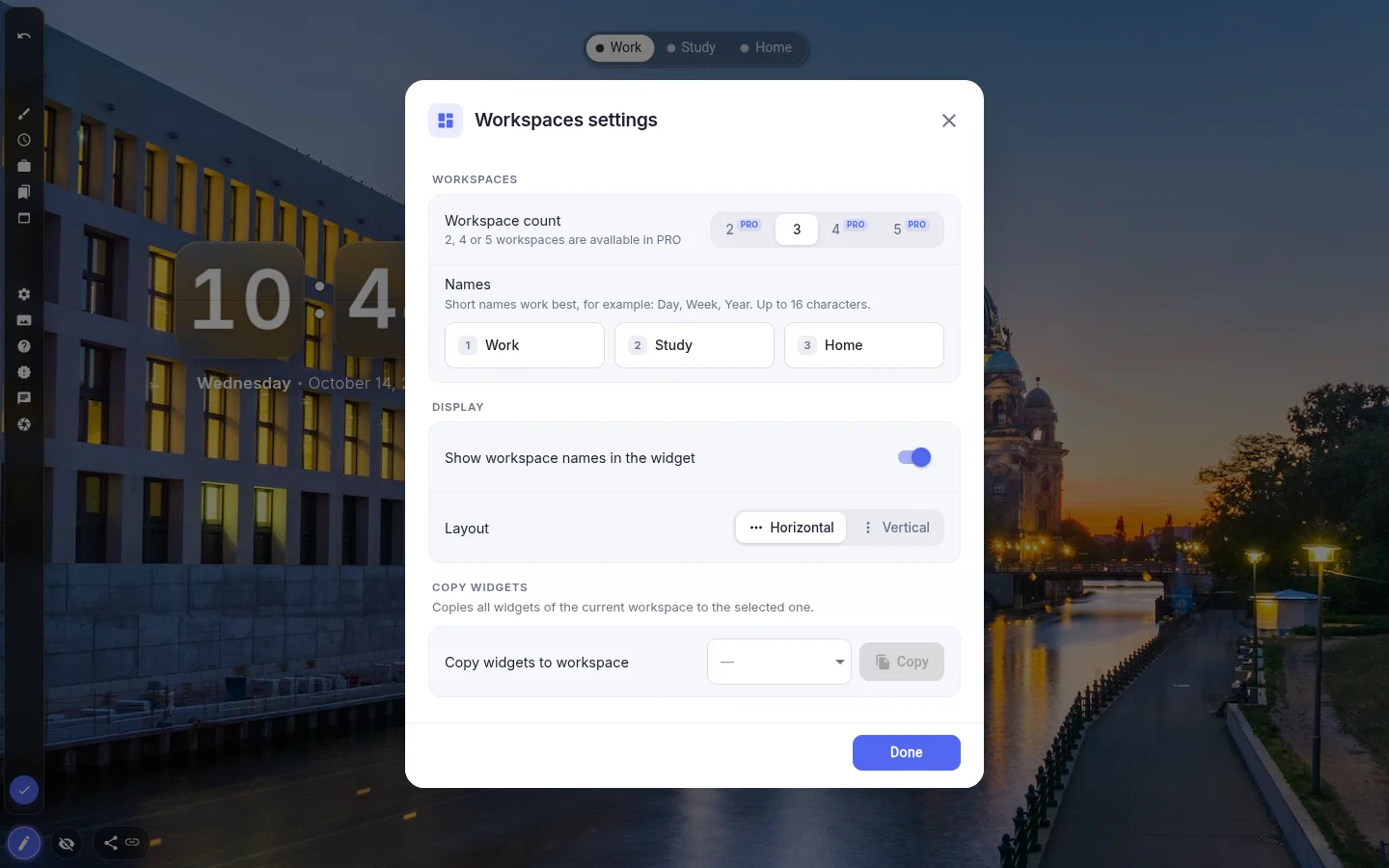
Give each workspace a name of up to 16 characters, then switch on "Show workspace names in the widget" to get tabs instead of dots. Names alone won’t do it, and the switch starts off.
Layout goes Horizontal or Vertical. A column of named tabs down the left edge suits a wide monitor.
Three free, and the catch with copying
Three is what the free plan runs. Any other count is PRO, including two, and five is the ceiling.
Copy widgets to workspace duplicates widgets only, not the wallpaper or the name. Copies count as widgets you added yourself, so on the free plan they use up the limit of three, and a copy that would go over it doesn’t happen at all; the PRO window shows instead. That catches people who built a workspace from a theme. Theme widgets are free right up until you copy them — then they count.
Workspace Switcher settings
- Workspace count
- 2, 3, 4 or 5. Three is free, the rest are marked PRO.
- Names
- One field per workspace, up to 16 characters.
- Show workspace names in the widget
- Tabs with names instead of dots. Off by default.
- Layout
- Horizontal or Vertical.
- Copy widgets to workspace
- Pick the target and press Copy. Widgets only, no wallpaper.
- Only for workspace N
- Lives in the background window once you have two or more workspaces.
What people use it for
- A work dashboard and a personal page that never mix.
- A study workspace per course, each with its exam countdown.
- A page for the sites you’d rather not see during work hours.
- A clean layout kept aside for screen sharing.
Put the workspace switcher on your new tab
It comes with New Tab Studio. The extension is free to install and needs no account to start.
- 1Add New Tab Studio to Chrome
- 2Open a new tab, click the button at the bottom left
- 3Pick the widget, then drag it into place
Questions about the workspace switcher widget
How can I create my own dashboard on the Chrome new tab?
Chrome’s own new tab lets you change the background, shortcuts and colours, but it can’t hold widgets, so a real dashboard takes an extension. In New Tab Studio you drop widgets anywhere on the page (tasks, a calendar, a clock), and the Workspaces switcher keeps separate dashboards for work, study and home. Three come free.
How do I keep separate new tab pages for work and home?
Workspaces give one Chrome new tab several pages, each with its own widgets, and a small switcher flips between them in one click. Name them (up to 16 characters each) and turn on Show workspace names in the widget to get tabs instead of dots. The wallpaper stays shared until you pick Only for workspace N in the background window.
How many workspaces do I get for free?
New Tab Studio gives you three workspaces for free, and the switcher widget doesn’t count toward the free widget limit. Any other number, two included, takes PRO, and five is the maximum. If PRO lapses, the switcher goes back to showing three.
Does copying widgets to another workspace count against the free limit?
Yes, copied widgets count as ones you added yourself, so on the free plan a copy that would take you past three doesn’t go through. That applies to theme widgets too, which are free only until you copy them. Copying takes widgets alone, never the wallpaper or the workspace name.
Widgets that pair well with it
See the full widget catalogue or browse themes other people have built.