
Workday countdown timer for the new tab
A workday countdown timer doesn’t aim at a date. It aims at the end of today, then at the end of tomorrow. It’s never finished, and it earns its keep at about four in the afternoon.
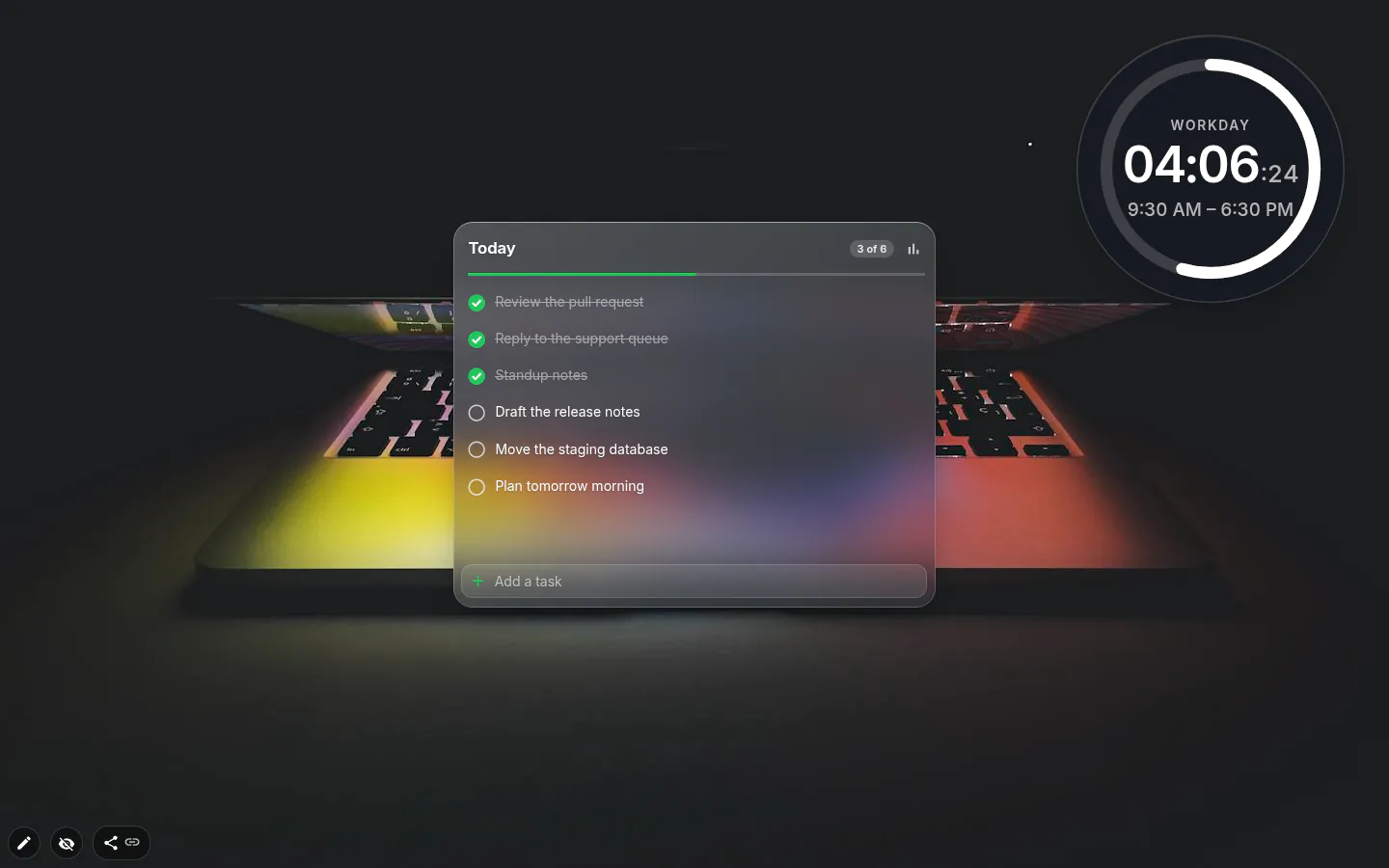
A ring for the working day
New workday countdowns start in Ring, a circle that fills as the day goes, with “Workday” and the hours and minutes left in the middle and the seconds small beside them. Switch on Show working hours and it adds “9:30 AM – 6:30 PM” underneath.
Minimal says the same with a thin bar and one line of text. Cards, Bold and Poster are there too, and Classic is the old plain countdown, which is what existing widgets keep.
Planning, not a pep talk
The obvious reading is motivational. The useful one is planning. At 15:40 with eighty minutes left you know not to start the two-hour job, and you’ve got time for the two small ones you’ve been dodging since Tuesday.
Working from home, it turns into a stopping signal. No commute, no office emptying out around you — a number running out does that job instead.
Your hours, PRO and night shifts
Out of the box the day runs from 9:30 to 18:30. Adding the widget is free, despite the PRO badge on its tile in the menu. Setting your own finishing time is PRO, as it was before 4.0.
The new designs add a second field, Workday starts at. It only feeds the ring or bar and the hours caption; the countdown itself cares about one thing, when you stop.
Night shifts work too. Start at 22:00, finish at 6:00, and the ring runs through midnight from the evening before. That needs a custom finishing time, so it’s a PRO setup.
What it doesn’t know
Weekends, for a start. It counts to the finishing time every day, Saturday and Sunday included, and there is no weekdays-only switch here. Park it on a workspace you only open for work if the weekend count annoys you.
After hours it reads “Workday is over!”, and the new designs throw confetti if the tab is open when the time runs out. After midnight it starts counting to today’s finish again, so at 1 a.m. it’ll cheerfully report seventeen and a half hours to go.
There is no sound and no notification, so it never interrupts. You look at it when you want to know.
Workday Countdown settings
- Workday ends at
- The time the countdown aims for. 18:30 on the free plan; set your own with PRO.
- Workday starts at
- New designs only. Drives the ring or progress bar and the hours caption, not the countdown.
- Units
- Hours, minutes and seconds, plus milliseconds in Classic. All three are on at first; hours and minutes are usually plenty.
- Show working hours
- Adds the day’s span, like “9:30 AM – 6:30 PM”, under the count.
- Design
- Classic, Cards, Bold, Ring, Minimal, Poster. New widgets get Ring.
- Layout
- Row or column, from settings or the toolbox.
- Look
- Font and colours from the toolbox. There’s no font-size box, so stretch the frame, and rounding sits in the Border panel.
What people use it for
- A stopping signal when you work from home.
- Deciding at half three whether to start something big.
- Next to a task list, saying how much day is left for it.
- On a work-only workspace, so it’s out of sight in the evening.
Put the workday countdown on your new tab
It comes with New Tab Studio. The extension is free to install and needs no account to start.
- 1Add New Tab Studio to Chrome
- 2Open a new tab, click the button at the bottom left
- 3Pick the widget, then drag it into place
Questions about the workday countdown widget
How can I see how much of my workday is left?
A workday countdown on your Chrome new tab counts the hours and minutes left until you finish, inside a ring that fills as the day goes. In New Tab Studio the day runs from 9:30 to 18:30 out of the box. At four in the afternoon one glance tells you whether the big job still fits.
Can I set my own working hours?
Yes, with PRO you can move the finishing time, night shifts included, such as 22:00 to 6:00 with the ring running through midnight. Without PRO the workday countdown ends at 18:30 (6:30 PM), which is plenty to see whether it suits you.
Does the workday countdown skip weekends?
No, the workday countdown runs to the finishing time every day of the week, Saturday and Sunday included, and has no weekdays-only switch. If that bothers you, put it on a workspace you only open for work. The weekdays-only option belongs to the date countdowns.
What happens when the workday ends?
When the workday countdown runs out it reads “Workday is over!”, and the new designs throw confetti if the tab is open right then. There’s no sound and no notification. After midnight it starts counting to today’s finish again, so at 1 a.m. it shows seventeen and a half hours to go.
Is the workday countdown free despite the PRO badge?
Yes, adding the workday countdown costs nothing even though its tile in the menu carries a PRO badge, and the six designs come free with it. PRO comes in only when you want to change the hours. The widget does count toward the three you can add yourself on the free plan.
Widgets that pair well with it
See the full widget catalogue or browse themes other people have built.